

 cloud / systems
When a coding agent is working, the terminal rarely lacks movement. Commands appear, files change and new messages arrive. Yet the questions I want answered can be much smaller: Which model is this session using? How full is its context? Am I looking at the session I think I am? And what is this work costing me?
The spinner answers a different question
My earlier ETA story was about planning my own time: should I wait, switch topics or come back later? A status line addresses a different part of the same problem. Before deciding what to do next, I want a clear view of the session in front of me.
A spinner tells me something is happening. A long transcript tells me what has happened. Neither necessarily gives me the facts I want at a glance.
What the status line makes visible
The supplied terminal view makes the idea concrete. One line brings together the selected route, the resolved model, context use and cost estimates. Project and account identifiers have been replaced with neutral examples.
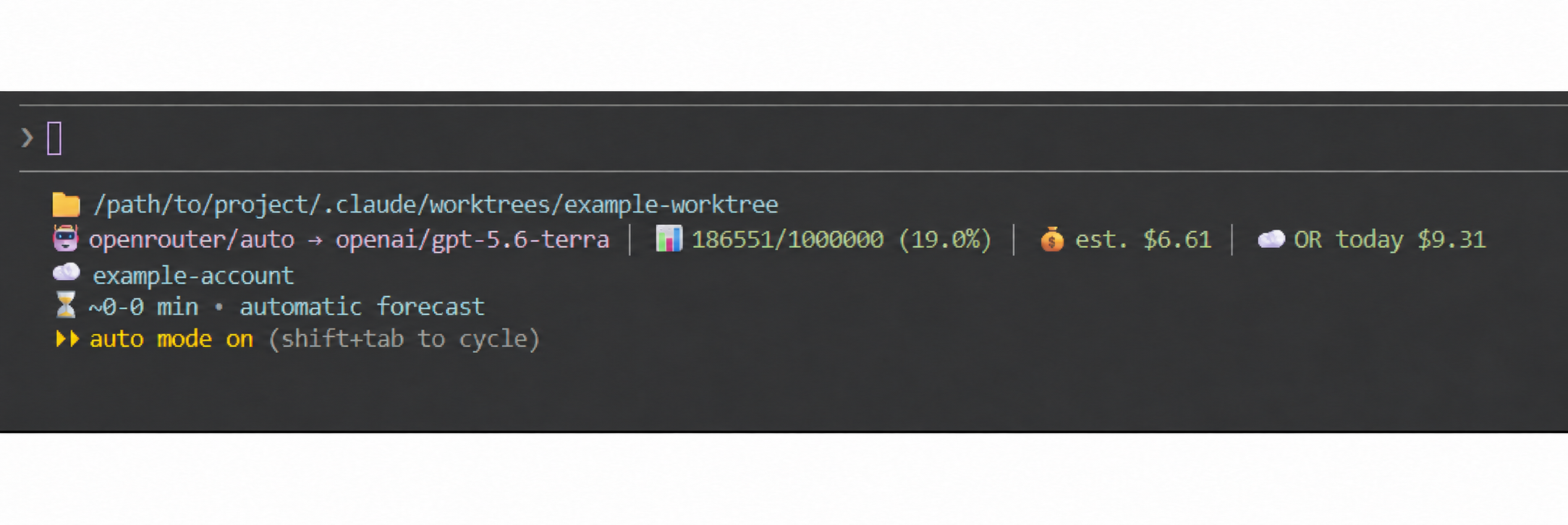
The routing label and the model it resolves to are different pieces of information. In this view, the route goes through OpenRouter and resolves to an OpenAI model. This is an extended configuration, not a claim about Claude Code’s default interface.
The context display reads 186,551 out of 1,000,000 tokens, shown as 19.0%. That makes an abstract capacity easier to read. But 19% context does not mean the task is 19% finished, and it tells me nothing by itself about the remaining minutes.
The cost fields are explicitly estimates or provider-specific counters. They need their own definitions; I would not confuse a number in a status line with a verified invoice. The forecast and automatic mode are additional signals in this setup, not features of the minimal renderer discussed here.
Cost control belongs in the same line
Cost visibility is one of the most useful reasons to add a status line. An agent can keep producing activity while I lose track of how many attempts, retries or parallel sessions I have started. I want to notice that before reviewing the bill.
The screenshot includes “est. $6.61” and “OR today $9.31”. Those are two differently labelled counters, not two amounts I should simply add together. Before relying on them, I need to know their scope, pricing source and refresh behaviour. Estimates help me steer; the provider’s usage records remain the place to check actual charges.
My practical routine would be simple:
- Set a spending checkpoint before starting. Decide when to pause and review further runs rather than waiting for an unpleasant surprise.
- Compare cost growth with useful results. If the number keeps rising while the same test keeps failing, narrow the task or inspect the blocker before asking for another broad attempt.
- Choose the next step deliberately. A smaller follow-up, a suitable model, or a manual check may be enough. Any model change still needs the same quality checks.
A visible counter is not an automatic budget cap and does not stop requests. API charges, subscriptions and provider-specific balances must also be kept separate. The point is to make spending a conscious part of the work, alongside time and technical quality.
A percentage should lead to a useful decision
A rising context figure is a prompt to think about continuity. Are the next steps clear? Have important decisions been written down somewhere durable? Would a concise handover help before starting the next part?
There is no universal percentage at which a session becomes bad. A compact, well-scoped task and a sprawling investigation place different demands on the conversation. I would use the number as orientation, then inspect the work itself.
A context meter also cannot tell me whether the agent needs permission or a decision. That requires an explicit attention signal, a separate topic for this series.
Unknown is a useful answer
The least helpful display is one that quietly turns missing information into a reassuring number. If a field is unavailable, the line should say so.
The screenshot shows values that are present. When a value is missing, I would prefer a plain “unavailable” to a green zero. It tells me which information I do not have, instead of suggesting precision the display cannot support.
Small enough to inspect and remove
Claude Code supports a configurable status line: a local command reads session JSON and prints the display. The official reference documents model and context fields. That gives this idea a practical starting point without needing another dashboard.
For a minimal version, I would start with model and context, then add a cost estimate only when its source and scope are clear. The renderer should use supplied fields: no repository scans, no network lookup and no conversation archive. Those are design choices for this example, not promises about every status-line extension.
Before enabling a renderer, I would try it with known inputs and check that missing values remain visibly missing. For me, the useful starting point is understandable signals, not the largest possible collection of numbers.
The goal is fewer things to keep in my head
A status line will not make an agent reason better or replace reviewing its changes. What it can offer is a small, consistent place for the information I otherwise have to remember or look up.
For me, that is the interesting direction for agent tooling: fewer interruptions to establish basic context, and more attention left for the decisions that actually need a person.
What would you put in one quiet line beneath your coding session?
Reference
Official Claude Code status-line documentation, checked on 27 October 2026.